
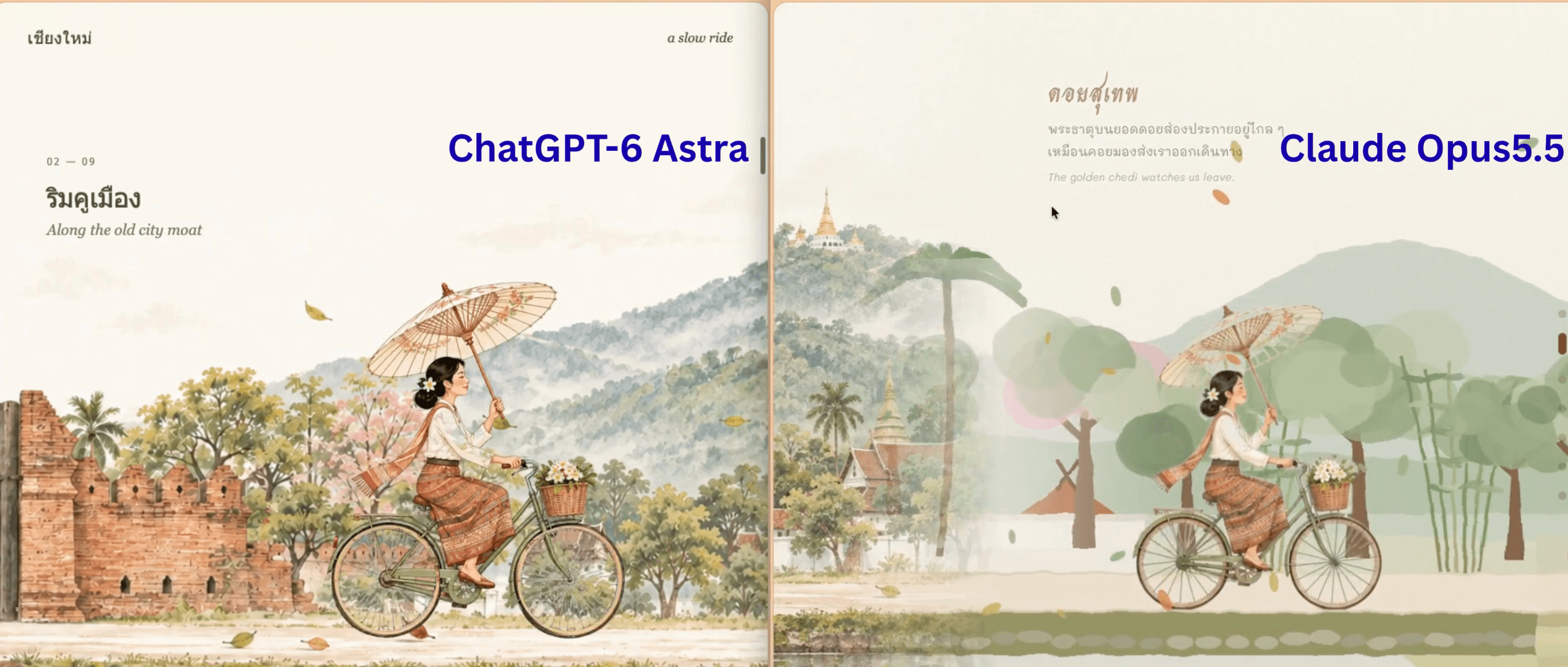
A Website That Tells the Story of Chiang Mai
Guide: Build a Scroll-driven Journey Scene with Claude
Scroll-driven Journey Scene with Claude
Turn one painting into a storytelling web page: as the viewer scrolls down, the character sets off through a series of places until reaching the destination.
1. What You Will Get
Process overview: generate the base image in ChatGPT → plan the route → have Claude build the web page → refine one issue at a time → (optional) generate the remaining scenes to upgrade the artwork
- A single
.htmlfile that you can put on a website right away - A character from your own image travels through 4–7 places
- A change of vehicle along the way (for example, bicycle → songthaew, the red shared truck)
- Parallax, captions, drifting leaves and a sky that changes with the time of day
- Works on both desktop and mobile
2. Step One: Create the Base Image in ChatGPT
The opening scene is the "prototype" for the whole site. The art style, color tone and the character's look will all follow this image, so it is worth spending time on this step.
2.1 Required Elements of the Image (very important)
┌──────────────────────────────────────────────┐
│  [empty sky for captions]         [landmark]  │
│                                              │
│  [city scene/trees]         🚲→ character     │
│══════════ horizontal road ═══════════════════│  ← about 70% of the image height
│  [water / grass / plants in the foreground]   │
└──────────────────────────────────────────────┘
- 16:9 landscape ratio
- A road or ground running horizontally in the lower part of the image (about 70% down from the top). The following scenes will continue from this line
- The character sits right of center, facing right (the direction of travel)
- The character does not overlap any landmark, because the area where the character stands has to be filled in with background later
- The upper-left to center sky must stay empty so you can place place names and text there
- No text in the image, because Thai text in AI images is often distorted. Claude will add signs and labels later
2.2 Fill-in-the-blank Prompt
A wide 16:9 hand-painted watercolor illustration with delicate ink lines on warm cream paper,
soft muted palette, gentle Studio-Ghibli-like storybook mood.

Scene: [first location, e.g. the old city moat of Chiang Mai with ancient red-brick walls and a wooden gate].
In the background on the right: [landmark, e.g. Doi Suthep mountain with a golden chedi on top].
Details: [trees, flowers, local architecture].

A straight road runs horizontally across the lower third of the image.
Below the road: [water / grass / flowers in the foreground].

Character: [describe the character, e.g. a young Thai woman in a white blouse and a Lanna-style woven skirt,
holding a paper umbrella], riding a [vehicle, e.g. vintage bicycle with a flower basket],
side view, facing right, placed right of center, fully visible, not overlapping any landmark.

Keep the upper-left sky empty and airy for text. No text, no letters, no signs in the image.
2.3 A Prompt Used in Practice (Chiang Mai)
A wide 16:9 hand-painted watercolor illustration with delicate ink lines on warm cream paper,
soft muted greens, terracotta and cream palette, calm storybook mood.

Scene: the old city moat of Chiang Mai in the morning. Ancient red-brick city walls with an open
wooden gate on the left, a frangipani tree with white flowers in the top-left corner, palm trees,
a pink blossom tree, Lanna temple roofs and white temple walls on the right.
In the background on the right: misty Doi Suthep mountain with a small golden chedi on the peak.

A straight light sandy road runs horizontally across the lower third of the image.
Below the road: a grassy stone bank and the calm moat reflecting the walls, with lotus flowers
and banana leaves in the foreground corners. A few leaves and birds drifting in the air.

Character: a young Thai woman with black hair in a low bun and a white flower behind her ear,
wearing a white long-sleeve blouse, an orange woven shawl and a Lanna-pattern tube skirt,
holding a cream paper umbrella, riding a sage-green vintage bicycle with a wicker basket of
white flowers. Side view, facing right, placed right of center, fully visible,
not overlapping the mountain or temples.

Keep the upper-left sky empty and airy for text. No text, no letters, no signs in the image.
2.4 Tips for Working in ChatGPT
- The image is not landscape: repeat the request with
Please regenerate in landscape 16:9 - The character faces the wrong way: ask
Same image, but the character faces right - The character overlaps a landmark: ask
Move the character slightly left so it does not overlap the mountain - Text appears in the image: ask
Remove all text and signs - Download the largest file you get, then attach it for Claude
- Keep this chat, because you will use it to generate the next scenes in a matching style (see the "Upgrade" section)
💡 The character is the heart of the project. If the face or outfit is not right yet, fix it in this step, because the character will be cut out and reused throughout the whole story, including when seated in a vehicle.
3. What to Prepare
| Item | Details | |---|---| | Claude | An account that can use Claude (Pro or higher recommended) | | Settings | Turn on Code execution and file creation in Settings → Capabilities | | Opening scene image | The image generated from ChatGPT in section 2 (16:9, character facing right) | | Sample video | (Optional) A screen recording of a website like the one you want | | Route | The list of places in order, and the point where the vehicle changes |
How to Choose an Opening Image That Works Well
- ✅ The character sits right of center and faces right
- ✅ The background around the character is plain or repetitive (road, sky, trees)
- ✅ There is a clear road or ground line
- ❌ The character overlaps a key landmark (hard to fill in the background)
- ❌ Several characters overlap each other
4. Plan the Story Before Writing the Prompt
Answering just these 3 questions is enough. Leave the motion in each scene to Claude.
① Where will the character go (in order)? Write one place per row, with one highlight each
| Place | Highlight | |---|---| | 1. | | | 2. | | | 3. | | | 4. | | | 5. | |
② Does the vehicle change? From ______ to ______ at ______
③ Who is the character? ______
Example (Chiang Mai)
| Place | Highlight | |---|---| | 1. Chiang Mai Old City moat | Brick walls | | 2. Doi Suthep | The pagoda on the mountaintop | | 3. San Kamphaeng Hot Springs | Geysers shooting up | | 4. Bo Sang umbrellas | Mulberry-paper (sa paper) umbrellas | | 5. San Kamphaeng walking street | Lanna lanterns | | 6. Nimmanhaemin | Coffee shops | | 7. Ang Kaew | Doi Suthep at dusk |
② Change from bicycle to songthaew at San Kamphaeng walking street
③ A woman in traditional dress, holding an umbrella, riding a bicycle
💡 4–7 places is about right. With more than that, each scene becomes so short that the journey feels rushed.
5. The Main Prompt (Ready to Copy)
Attach the opening scene image (and the video, if you have one), then paste this prompt, editing only the parts inside [ ]
You are a creative front-end developer who specializes in scroll-driven storytelling and watercolor-style illustration.

## Task
Build a single-file HTML web page that is a "horizontal animated journey scene" driven by scrolling.
When the user scrolls down, the camera pans to the right and the character travels through the places in order.
(If a sample video is attached, study its pacing and effects first before you start.)

## Input
- Opening scene image: [attach image]. The image shows a character: [describe, e.g. a woman riding a bicycle and holding an umbrella]
- Route (in order):
  1. [place in the image] – highlight: [...]
  2. [next place] – highlight: [...]
  3. [...] – highlight: [...]
  4. [...] – highlight: [...]
- Vehicle change point: at [place], change from [bicycle] to [songthaew/tuk-tuk/boat]
- Destination: [final place]
- Caption language: [Thai + a smaller line of English]

## Steps to follow
1. Use Python (rembg + OpenCV) to cut the character out of the image as a transparent PNG/WebP
   (including any props the character is holding or wearing),
   then fill in the background where the character used to be so it looks seamless, by patching from neighboring areas combined with seamlessClone.
   Check the result by looking at the actual image every time.
2. Draw the scenes that continue from the original image as a watercolor-style SVG
   - Pull the colors from the original image
   - Keep the road line and the horizon at the same level as in the image
   - Use feTurbulence + feDisplacementMap so the edges look hand-painted
   - Fade out the right edge of the original image so it blends into the continued scene
3. Every place must have 1–2 clear recognizable features (a landmark, a name sign, something the place is known for)
   and at least 1 gentle motion per scene.
4. Scroll mechanics
   - Use a sticky stage inside a scroll container that is tall enough
   - Map scroll progress to the character's position piecewise
   - At the vehicle change point, include a "pause" stretch: the new vehicle drives in and parks, the character gradually fades out,
     then appears in the vehicle instead
   - The camera follows the character (the character sits at about 60% of the screen width) and uses easing/lerp for smoothness
   - Build 3-layer parallax: distant mountains / main scene / foreground plants
5. Additional details
   - Wheels turn with the distance traveled, and the character bobs up and down while moving
   - Leaves drift across a canvas according to scroll speed
   - The sky gradually changes from morning to evening along the route
   - The caption for each place fades in and out according to the character's position
   - Navigation dots on the right side of the screen; clicking one jumps to that place
   - A "Back to the start" button at the end
6. Quality
   - Support portrait mobile
   - Respect the prefers-reduced-motion setting
   - Embed the images as base64 in the single file
   - Take screenshots with Playwright at several scroll positions on both desktop and mobile,
     and fix anything that looks wrong before delivering

## Output
- A single .html file ready to put on the web
- A short summary of what each scene contains, and a straight account of the limitations
6. Prompts for Refining the Work (Round 2 Onward)
Fix one issue at a time. It works better than sending everything at once.
| Problem | Prompt to use |
|---|---|
| The seam between the first image and the next scene is clearly visible | The seam at the right edge of the first image still shows a line. Please widen the fade and add a thin mist at the seam |
| The continued scenes are too saturated | The trees and buildings in the SVG scenes are too saturated compared with the original image. Please reduce the saturation and opacity so they look more like watercolor |
| A landmark is not clear | In the [x] scene it is hard to tell it is [place]. Please make [recognizable feature] more prominent |
| Text overlaps the image | The caption overlaps the roof in the [x] scene. Please reduce the building height or move the caption |
| On mobile the character is too big | On mobile, the character and vehicle are too big. Please adjust the scale so more of the scene is visible |
| The evening tones are too dark | The evening tone is too red. Please reduce the tint by half |
| You want the scroll longer or shorter | Please make the scroll length [longer/shorter] by about [30]% |
7. Upgrade: Make Every Scene as Beautiful as the First Image
Scenes that Claude draws as SVG look plainer than a real painting. If you want the whole story to have one consistent hand, do this:
Step 1: Go back to the original ChatGPT chat where you generated the base image, and generate the scenes one at a time with a prompt like this, so the style stays continuous
Watercolor illustration, same style as the reference image, soft paper texture,
muted greens and warm cream palette. Scene: [place + recognizable feature].
Wide landscape 16:9, a road running horizontally across the lower third,
no people, no vehicles, empty sky in the upper-left area for text.
Step 2: Attach all the images back to Claude and say
These are the images for scenes 2–[n], in order. Please replace the existing SVG scenes with these images.
Blend the images seamlessly by fading the edges, and align the road line across all images,
while keeping the character, the vehicle change and all the existing effects.
💡 Always include "no people, no vehicles" in the prompt, because the character will be layered on top later.
8. Troubleshooting Common Problems
| Symptom | Cause / Fix |
|---|---|
| Claude says it cannot run code | Code execution is not turned on yet → turn it on in Settings, then start a new chat |
| Cannot cut out the character (rembg does not work) | Ask If rembg does not work, redraw the character as an SVG instead |
| The cutout is missing part of the character (for example, the basket) | Ask When cutting out the character, the basket on the front of the bike was lost. Please add it to the mask too |
| The filled-in background is blurry | Ask Please try filling it by copying a patch from the side instead of a blurry inpaint |
| The font is wrong | The font loads from Google Fonts, so the file must be opened online |
| The file is large | Ask Please compress the images to WebP at quality 80 |
| Stuttering on mobile | Ask Please reduce the number of drifting leaves on mobile and reduce filters on scenes with motion |
9. Using It on the Web
- Full-page: upload the
.htmlfile to a web host (Netlify, GitHub Pages, Wix custom code) - Embed in an existing page:
<iframe src="journey.html" style="width:100%;height:100vh;border:0" title="Journey scene"></iframe>
⚠️ If you embed it as an iframe, the scrolling happens inside the iframe frame. If you want the whole page to scroll, use the full-page option instead.
10. Pre-delivery Checklist
- [ ] The character starts at the same position as in the image, with no jump
- [ ] Where the character used to be, there is no visible blur or patch
- [ ] The seam between the first image and the next scene blends together
- [ ] Every place is recognizable
- [ ] The vehicle change is smooth, and the character does not simply vanish
- [ ] Captions are easy to read and do not cover important parts of the image
- [ ] Every navigation dot on the right is clickable
- [ ] It still looks good on mobile
- [ ] When you scroll to the end, there is a button to return to the start
11. Ideas to Extend It
- Tourism businesses: a storytelling trip map for a hotel, or a one-day tour
- Brand story: the journey of a product from the farm to the customer's hands
- Personal portfolio: the path of your life and career, with each place standing for a stage of work
- Teaching materials: the water cycle, an ancient trade route, or local history
Produced by Custocare Co., Ltd. — We Customize with Care