What Is ChatGPT Ads, and How Can Thai Businesses Advertise in ChatGPT?
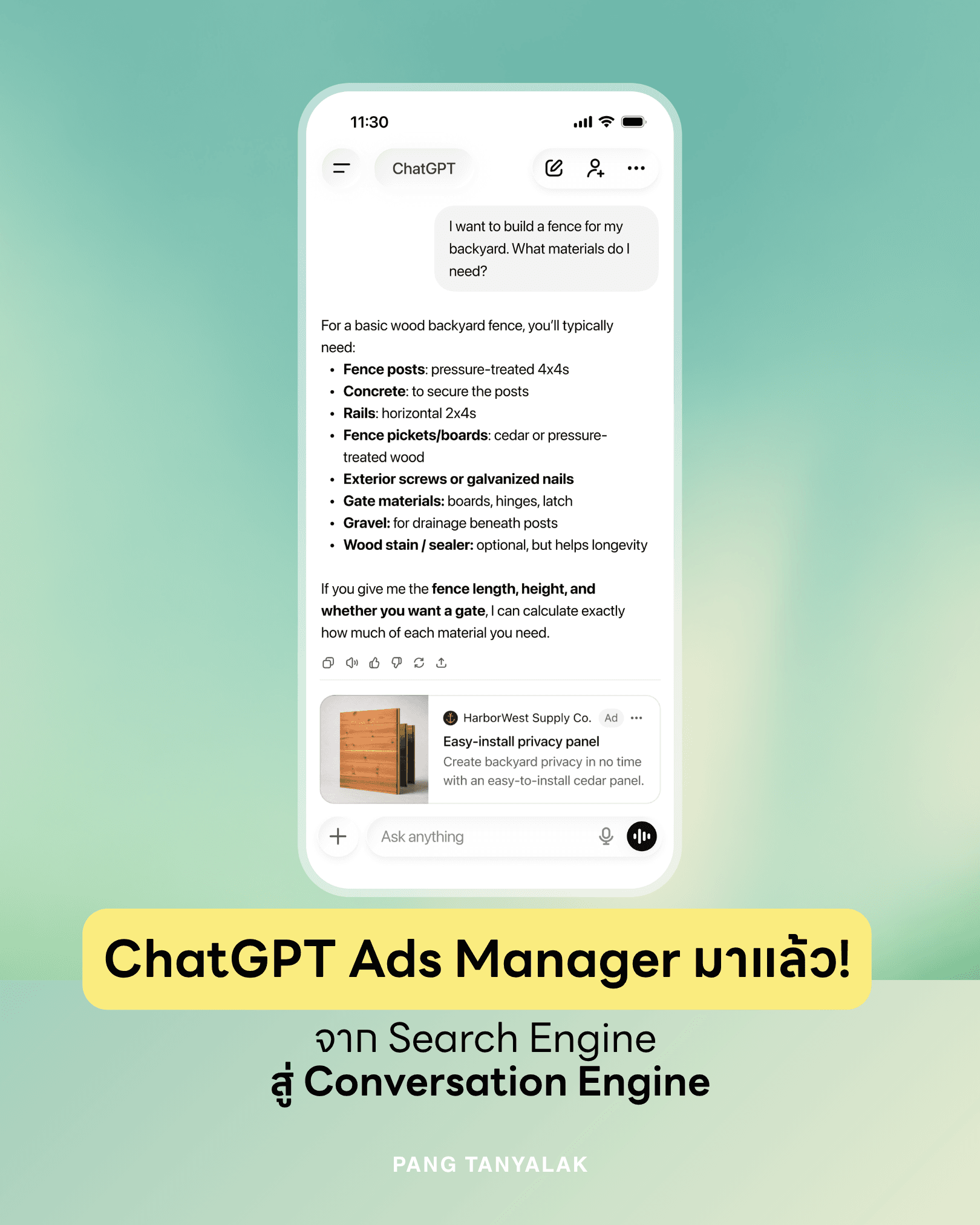
ChatGPT Ads are ads shown below ChatGPT's answers and clearly labeled as advertising. Businesses in Thailand have been able to run ads on their own through ChatGPT Ads Manager at ads.openai.com since 23 September 2026. There are 5 main steps: sign up for an account, create a campaign, create an ad group with Context Hints, create the ad itself, then launch the campaign and track the results.
OpenAI has announced the expansion of ChatGPT Ads to Thailand, Indonesia, Malaysia, the Philippines, Singapore, Vietnam and Taiwan at the same time, following the Asia-Pacific markets that opened earlier: Australia, Japan, South Korea and India (OpenAI, 2026). Businesses of any size can sign up on a self-service basis, or buy through OpenAI's sales team and agency partners. The channel is growing very fast. On 31 August 2026, OpenAI reported that ChatGPT Ads had reached annualized revenue of $1 billion in under 200 days after launch, with tens of thousands of advertisers (Newsbytes, 2026). Marketers who start learning now therefore have an advantage over competitors who are still waiting to see how things develop.
How Is ChatGPT Ads Different from Google Search Ads?
The main difference is in how ads are selected. Google Search Ads are auctioned by the keyword a person types. ChatGPT Ads has no keyword auction. The system looks at the context and intent of the whole conversation, together with the landing page, the ad copy and the Context Hints the advertiser has added, to choose the ad that matches what the user is trying to decide.
On Google, users usually type short terms such as "accounting software". On ChatGPT, users give far more detail, for example: "I have a clothing shop with 2 branches, selling both online and in store. I want accounting software that combines my sales. What should I use?" The system can therefore understand the need in much finer detail. According to OpenAI's documentation, ad selection combines several signals: the context of the current conversation, the landing page, the ad headline and copy, Context Hints, targeting settings and, if the user has turned on ad personalization, some signals from that user's ChatGPT usage. When several ads qualify, the system weighs both relevance and bid price (OpenAI Help Center).
In short, the world of search is moving from keywords to intent, and is becoming a full conversation.
How Many Steps Does It Take to Advertise in ChatGPT?
Advertising in ChatGPT takes 5 steps. Start by signing up at ads.openai.com with an OpenAI account. Next, create a campaign to set the objective and budget. Then create an ad group and add Context Hints, create the ad itself with an image, headline, description and link, and launch the campaign to track results in Ads Manager. The structure is similar to Google Ads, which marketers already know well.
1. Sign up for an Ads Manager account
Go to ads.openai.com, then Sign up or Log in with your OpenAI account. Next, fill in your business details, set up Billing and add a Payment Method. Use a company email address to sign up.
2. Create a campaign
Click Create, then choose Create Campaign. Then set the objective, budget, start and end dates, and target country. There are 3 main objectives: Reach, which focuses on visibility and is billed by CPM; Clicks, which focuses on driving traffic to your website and is billed by CPC; and Conversions, where the system optimizes for sales or leads. For CPC campaigns, OpenAI recommends starting with a maximum bid of $3–5 per click (OpenAI Help Center).
3. Create an ad group and add Context Hints
An ad group organizes ads by product or customer segment, and it is where you add Context Hints, the heart of ChatGPT Ads (explained in detail in the next section).
4. Create the ad
One ad consists of an image, a headline, a description and a landing page. Write it so it is clear what the product helps with and who it suits, and make several versions so the system can pick the message that fits each conversation.
5. Launch the campaign and measure results
Once the ad has been reviewed and approved, you can see Impressions, Clicks, Spend, CTR, Average CPC, Average CPM and Conversions in Ads Manager. You should also add UTM parameters to the landing page link so you can track the traffic further in Google Analytics.
What Are Context Hints, and How Should You Write Them?
Context Hints are short pieces of text that tell the system what the product helps with (What), who it suits (Who), and in what situation it is useful (When). They are not exact-match keywords, and they do not guarantee that your ad will appear every time that term comes up in a conversation. But they help the system understand which kinds of conversation your ad is relevant to.
A common mistake is to copy keywords straight over from Google Ads, such as "accounting software, cheap accounting software, accounting software SME". This gives the system very little information. A better approach is to write sentences that describe the customer's situation, for example:
- What: Accounting software that brings online and in-store sales together in one place
- Who: Retail shop owners who sell through several channels and have no full-time accounting team
- When: While comparing software options, or when month-end reconciliation has started to become a headache
This is the same skill as writing a good prompt: you have to explain the context so the AI understands, rather than throwing a few short words at it. Paeng taught this skill in the AI for Marketing course for the 35-person marketing team at Pisona Group in Phuket in May 2026. Teams that write good prompts also tend to write good Context Hints. If your brand sells to both Thai and international customers, set up separate ad groups and Context Hints for each language rather than using one set translated word for word.
Who Sees the Ads, and Do Ads Affect ChatGPT's Answers?
Ads are shown only to users on the ChatGPT Free and Go plans. Users on Plus, Pro, Business and Enterprise do not see ads. Ads appear in a separate box below the answer and are clearly labeled. OpenAI confirms that ads do not influence the answers ChatGPT generates, and that advertisers are not given access to users' private conversations.
For marketers, this tells us two things. First, you cannot buy an "answer" with ChatGPT ads. Appearing in ChatGPT's answers without paying still has to be done through GEO (Generative Engine Optimization), which means making your web content trustworthy and something AI will pick up and cite. Second, the target audience of ChatGPT Ads is free users, who are numerous. It suits products that people tend to ask AI about before buying, such as software, courses, professional services, and products where specifications need to be compared.
So the marketer's question has changed. Instead of asking "How do we get on the first page of Google?", we now also have to ask "When people ask ChatGPT about topics related to our business, how can our brand be there?" And the answer needs both the advertising side and the GEO side working together.
Frequently Asked Questions
Is ChatGPT Ads open for Thai businesses to advertise yet? Yes. OpenAI began rolling out ChatGPT Ads in Thailand on 23 September 2026, together with other Southeast Asian countries and Taiwan. Businesses that meet the requirements can sign up on their own at ads.openai.com, or buy through OpenAI's agency partners. Access is being rolled out gradually, so some accounts may not be able to use it immediately.
How does ChatGPT Ads charge? There are 3 billing models, depending on the campaign objective. Reach is billed per 1,000 impressions (CPM), Clicks is billed per click (CPC), and Conversions lets the system optimize for sales or leads. For CPC, OpenAI recommends starting with a maximum bid of $3–5 per click. Advertisers can set their own daily budget and total campaign budget.
Can Context Hints replace keywords? They can replace them in the sense that they tell the system which kinds of conversation your ad should appear in, but they do not work the same way. Context Hints are not exact-match keywords, and they do not guarantee that your ad will appear. Write them as sentences describing what the product helps with, who it suits and in what situation it is used. Do not paste in a list of keywords.
Who will see ads in ChatGPT? Only users on the Free and Go plans. Paying users on Plus, Pro, Business and Enterprise do not see ads. Ads appear in a separate box below the answer and are clearly labeled. Users can also choose whether the system may use their usage data to personalize ads.
If I pay for ads, will my brand be recommended in ChatGPT's answers? No. OpenAI confirms that ads do not influence the answers ChatGPT generates, and ads are always shown separately from the answer. If you want your brand to be mentioned in answers without paying, you need to do GEO, which means adjusting your web content so AI can understand it and cite it. That is a separate job from buying ads.
How do I measure ads in ChatGPT? In Ads Manager you can see Impressions, Clicks, Spend, CTR, Average CPC, Average CPM and Conversions. To measure conversions more accurately, install the OpenAI Pixel or the Conversions API, and add UTM parameters to the landing page link so you can track user behavior further in Google Analytics or whichever analytics tool you use.
Is there a promotion for new advertisers during the launch period? Yes. New ad account sign-ups can receive a 3,000 baht Ad Credit once they spend 3,000 baht, subject to the promotion's terms. [Pending: link to OpenAI's promotion terms page] Read the terms and duration in Ads Manager before starting a campaign.
Author: Tanyalak Techapeompol Managing Director of Custocare, an AI and Digital Transformation consultancy, with 17 years of IT experience Former CIO of Oasis Spa Group, overseeing IT across 14 branches in 4 provinces · AI speaker and guest lecturer at Chiang Mai University and private-sector organizations Profile · LinkedIn · Certifications · Facebook
Published: 24/09/2026 | Last updated: 24/09/2026
References